Is there an app that can redesign my whole house from photos, room by room?
How to turn a one-room-at-a-time app into a plan for the whole house: the style sentence, the room order, what it costs, and which apps go further. Checked November 16, 2026.
Updated November 16, 2026 · By Daniel Borodin, founder of airender.ai
Short answer
Yes, but almost every photo app works on one photo of one room at a time, so a whole house comes from running every room through the same style. airender works that way: one photo per room, the same preset and the same few words each time, and a shopping list with a total for every room, with Whole Home at $75 one-time covering them all. Each room's picture is built from the products on its list, so adding the room totals gives you a real number for the house. The images are not to scale, so measure before you buy.
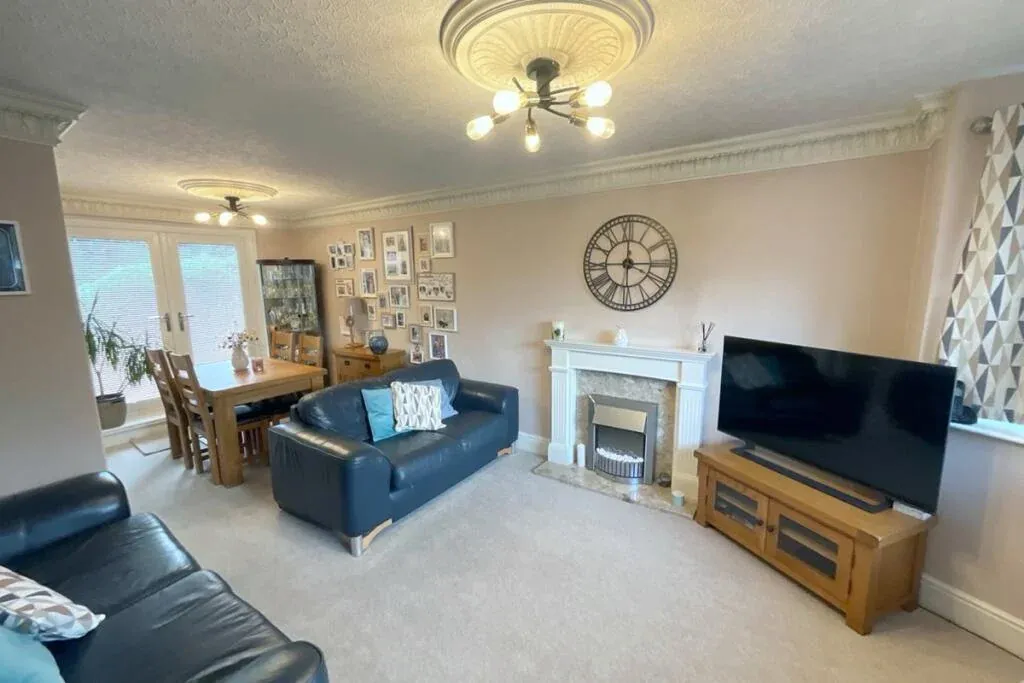 Before
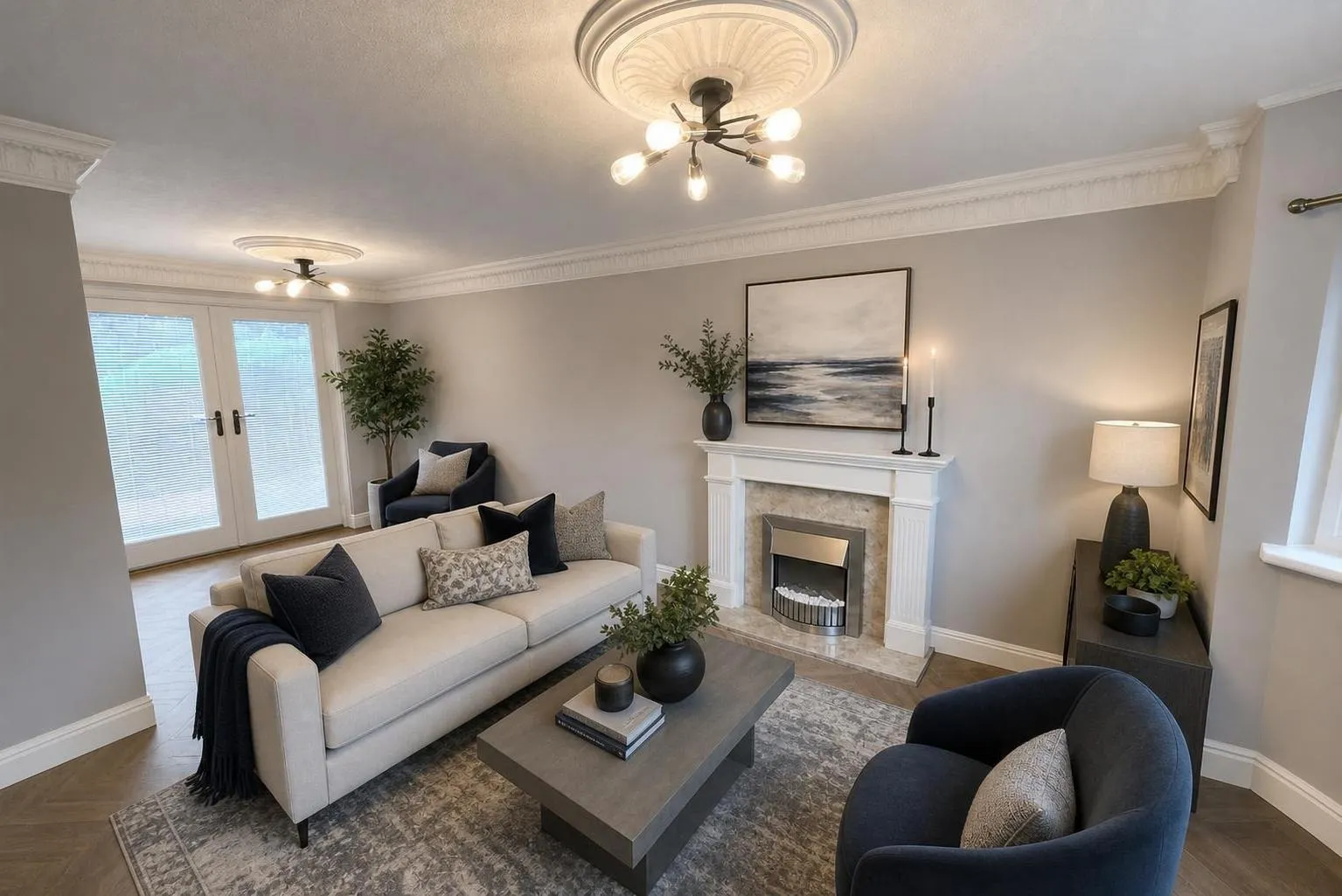 After, with airender
One photo per room, one sentence for the house
No app turns a single upload into a finished house. Photo apps restyle a picture of one room and you repeat for the next; 3D planners build a model or floor plan that you then furnish. The trick that makes a photo app work for a whole house is a style sentence: one line you paste into every room, for example "white walls, light oak, cream textiles, black metal". airender does not carry a style from one room to the next on its own, so that sentence, plus the same preset, is what keeps the rooms related.
The run above shows the two settings that matter most for a house. First, the carpet came back as herringbone wood, which only happens when floors are allowed to change. For a house, leave floors locked (the default): flooring that runs from room to room already ties the place together, and a redesign that swaps it in one room will clash with the next. Second, the dining table by the French doors disappeared. In an open-plan room, write what must stay in the notes, such as "keep the dining table by the doors and the TV on the right wall".
Start with the anchor room
Redesign the room you use most first, usually the living room. Once you like it, copy its colors, wood and metal into your style sentence; that room becomes the rule for the rest.
Each room's design starts from real products: airender picks a listing for every piece, then draws the room from them, so the room total is the cost of what you see. How airender picks real furniture walks through that order, and designing every room with furniture you can actually buy covers why it matters. It is an AI image, so check color and size on the listing before you order.
What to repeat so the rooms feel like one home
A house reads as put together when a handful of things repeat, not when every room is a copy (the full method, with paint strips and a doorway sightline map, is in how to make a house look cohesive from room to room). Build these into the sentence.
One palette, changing ratios
One Mumsnet poster chose white, navy, pale grey and mustard for the whole house "so that I don't have randomness in each room". Keep 3 or 4 colors and change the mix: mostly white with navy accents here, more navy there.
One wood tone
Light oak, walnut or a dark stain for tables, frames and shelves. Mixed woods make neighboring rooms look like they came from different houses.
One metal finish
Black, brass or brushed nickel on lamps, handles and rods, written into the sentence so every redesign uses it.
One textile family
Linen, wool and jute belong together; velvet and shiny synthetics form another group. Repeat one family in rugs, curtains and cushions.
Check the doorways
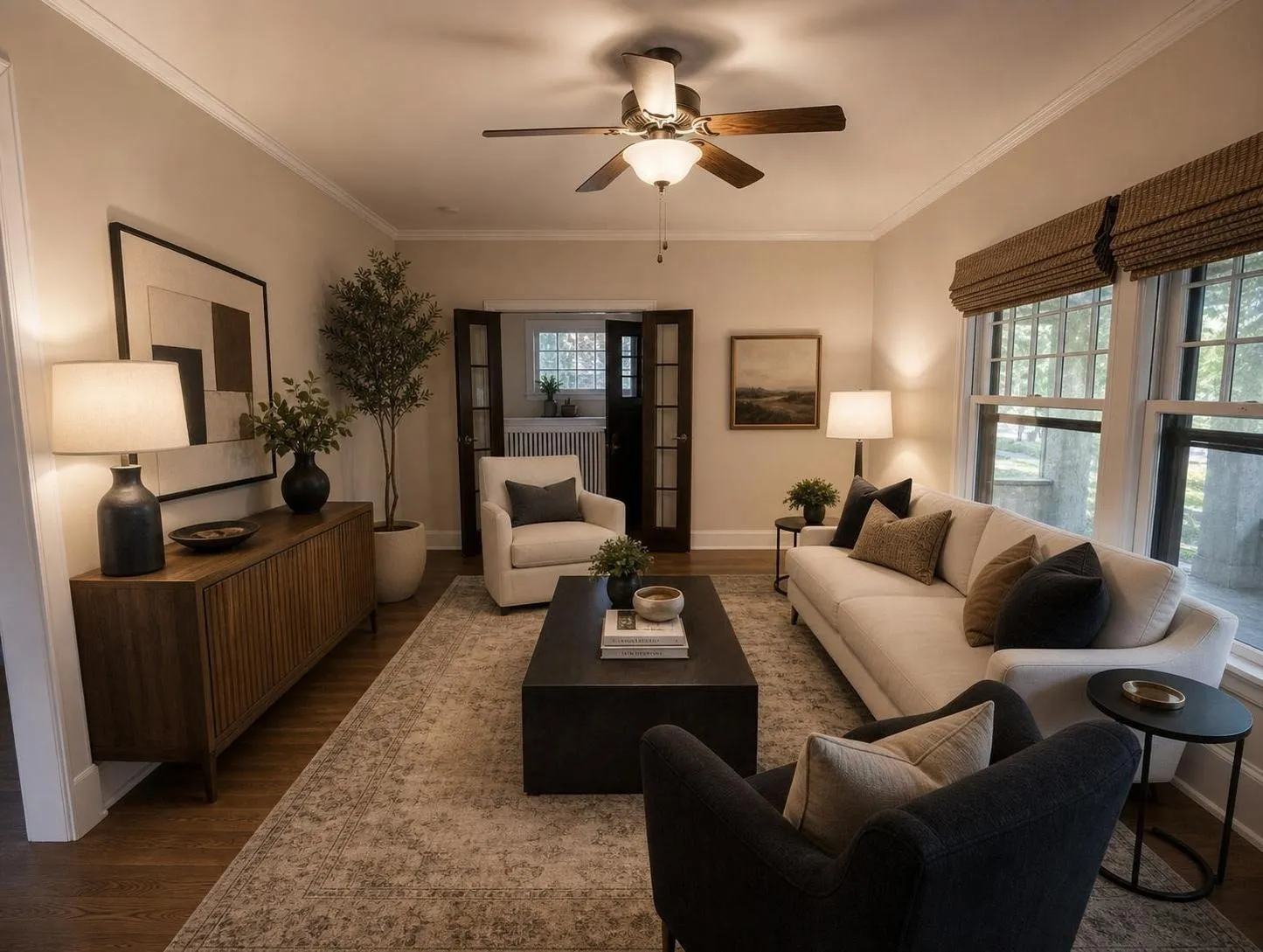
Photograph the view through each doorway into the next room, then put the two redesigns side by side before you buy. If the wood or metal clashes, edit the sentence and redo the weaker room. A Mumsnet reply points to Farrow & Ball's advice for the same reason: choose a palette "so it doesn't jar when you go from one room to the next."
The order to do the rooms in
Mumsnet threads like "Where to start redecorating entire house" keep landing on the same sequence:
- Building work first. Windows, wiring, plastering and flooring before any paint or furniture. On the "whole house to decorate" thread, one reply suggests off-white everywhere and no new flooring until the building work is done.
- The room you use most. Houzz suggests starting where you spend most of your time if the whole place cannot be done at once.
- Open-plan spaces as one zone. If the kitchen opens onto the dining or living area, plan them together, since you see them together.
- Bedrooms next. They are private, so they can wait, and they can take a softer version of the main palette.
- Hallways and stairs last. One poster, who went living room, bedrooms, bathroom, kitchen, then the rest, warns that "hallways will get heavily trodden while you work on other rooms, so probably best left to last."
Why not buy for every room at once? It spreads the money thin, and the first rooms teach you what you actually like. A poster who redecorated after a renovation recommends finishing the styling only once you live in the rooms, and warns that "colour on a card differs hugely from the wall." Plan every room up front, then buy room by room.
Stuck on choice? Another reply on the same thread: paint everything off-white first, because "Just cheap plain white paint is the best basis for long term decisions anyway." A reply on merging paint colors adds a rule for light: creams and light neutrals in sunny front rooms, "darker tones and more muted but similar colours" in a darker kitchen or back room, and "bright accents that could be changed seasonally". Same family, different depth, so the house still flows.
Rooms that are still bare when you move in work the same way; furnishing an empty room from a photo covers what to buy first in each. For the living room you start with, see the living room version of this question.
Apps that handle more than one room (checked November 16, 2026)
| App | How it handles several rooms | Shopping list or buy links? | Price (Nov 16, 2026) | Best for |
|---|---|---|---|---|
| airender | A photo per room with the same preset or sentence each time; 8 room types | Yes: every room gets products picked first, drawn in, and listed with store, price where available, buy link and a total | 1 redesign free (card added, $0 today); $27 one-time per room; $75 one-time for every room | Seeing each room and its cost, one price for the house |
| ReimagineHome | Pitches "a consistent style direction across several spaces", inside and out, curb appeal included | The Pro plan lists "Real Products Discovery + Visualization"; Essential lists no real shoppable products | Monthly credit plans in a $14 to $99 range; 5 free designs with no card for the trial | Interiors plus the outside of the house |
| Interior AI | Renders 4, 8 or 16 rooms in parallel depending on plan; builds a 3D model from a phone walkthrough video | Mentions furniture you could buy at IKEA, with no shopping list described | Pro $49 a month or $349 a year; Premium $99; Ultra $199; no free tier described; no refunds | Many renders fast, or a 3D model of the home |
| Planner 5D | One photo per room ("repeat the steps for the next room"), plus 2D and 3D home plans | No shopping links described | No monthly AI credits on Free; Premium $19.99 a month or $59.99 a year with 100 credits a month | A measured plan of the whole home |
| IKEA Kreativ | Scan each room with a series of photos, erase items, drop in IKEA pieces | Yes, IKEA products only | Free | A house furnished mostly from IKEA |
| RoomGPT | Single photos; its homepage says nothing about multiple rooms | No shopping list or product links mentioned | Credits; no prices before sign-in; a FLASH60 code for 60% off was showing | Quick previews of single rooms |
| ChatGPT | A photo and a prompt per room, pasting the same style words each time | Its shopping research is separate from the image, and OpenAI warns prices can be wrong | Limited image creation on Free; Plus $20 a month | Talking through colors and ideas |
| Havenly (human designer) | A designer plans each room as its own package | Yes: a list of the designer's picks, orderable through Havenly | Priced per room; see havenly.com/pricing | Handing the decisions to a person |
If the outside of the house matters as much as the inside, airender vs ReimagineHome compares the two directly. Moving walls or need measured layouts for every room? A 3D planner fits better; see Planner 5D alternatives, and check Planner 5D's monthly vs yearly billing before you subscribe. Prefer a person to make the calls? Compare designer services in Havenly alternatives.
Design cost for one room versus five
| Option | 1 room | 5 rooms | Renews? |
|---|---|---|---|
| airender | 1 redesign free, or a $27 one-time Room Plan | $75 one-time Whole Home (five Room Plans would be $135) | Never |
| Interior AI | $49 for one month | $49 a month, or $349 a year | Yes; no refunds |
| Planner 5D | $19.99 a month (Premium) | $19.99 a month, or $59.99 a year | Yes |
| ReimagineHome | $14 to $99 a month range | Same range, depending on credits | Yes, monthly |
| ChatGPT | Free, with limited image creation | Plus at $20 a month | Yes, monthly |
| IKEA Kreativ | Free | Free | No |
Which airender plan for a house? The 1 free redesign covers one room (a card is added, $0 charged). A Room Plan is $27 one-time for one room with unlimited restyles and edits of it. Whole Home is $75 one-time for every room, with unlimited redesigns, restyles and edits, all future styles and priority support, and it never expires. Three Room Plans come to $81, so from the third room on, Whole Home is cheaper. Details are on the pricing page.
The design fee is the small number; the furniture is where the money goes. Add up the room totals, then test them against your budget with the furniture budget calculator, or compare it with typical apartment ranges. When a room is ready, the whole room can go into your Amazon cart in one click, so you can buy in stages. Buy links go to the Amazon product page or, when no exact listing is available, an Amazon search for that piece.
What a set of room pictures cannot do
Room pictures are not a house plan
airender's images are visual concepts, not to scale, so measure before you buy. It draws no floor plans, 3D models or renovation plans, and kitchens and bathrooms are restyled visually without pricing plumbing, cabinets or contractor work (the bathroom photo app comparison covers tools that do estimate remodels). Each design starts from one photo of one room, so it will not show how rooms connect. The room types are living room, bedroom, dining room, home office, entryway, porch or patio, kitchen and bathroom; hallways, stairs, laundry rooms and garages are not on the list. Store prices can change before checkout.
- Want every room plus what to buy, for one price: try airender with two rooms free.
- Want the outside of the house too: ReimagineHome.
- Need a measured layout or are moving walls: Planner 5D.
- Want hundreds of renders or a 3D walkthrough model: Interior AI.
- Furnishing mostly from IKEA: IKEA Kreativ, free.
- Want a person to decide for you: Havenly.
Questions people ask
Straight answers to the follow-up questions.
Can I upload my whole house at once?
Not in airender: it takes one photo per room, and you repeat with the same style. Interior AI advertises 4 to 16 rooms rendered in parallel depending on plan, and ReimagineHome advertises a consistent style across several spaces, but every room still starts from its own photo.
How do I make every room match without everything looking the same?
Repeat a few things and vary the rest: 3 or 4 colors used in different amounts, one wood tone, one metal finish and one textile family. Let furniture shapes change from room to room, and give bedrooms a softer version of the main palette.
Which room should I redesign first?
After any building work, the room you use most, usually the living room, because its palette sets the rule for the rest. For a cheap test of the palette, a small room such as a home office works before you spend on the big rooms. Leave hallways for last; they take a beating while everything else is done.
Is airender's Whole Home plan worth it compared with paying per room?
From three rooms up, yes on price alone: three Room Plans cost $81 and Whole Home is $75 one-time for every room. For one or two rooms, the 1 free redesign plus a $27 Room Plan where needed costs less.
Can an app design my house exterior or garden?
airender's only outdoor room type is porch or patio, so it will not redesign a facade or a full garden. ReimagineHome advertises exterior and curb appeal ideas from photos, which makes it the better pick if the outside matters most.
Is the furniture in each room picture something I can buy?
In airender, yes: it picks a real product for each piece first and draws the room from those, so the furniture in each room's picture is the furniture on that room's list. IKEA Kreativ also places real products, IKEA's only.
Start with the room you use most
Redesign two rooms free in the same style and see each room's shopping list, then cover every room with Whole Home for $75 one-time.
Related
- Is there an app where I can take a picture of my living room and redesign it?
- Is there an app that furnishes an empty room from a photo and tells me what to buy?
- airender vs REimagineHome: which is better for redesigning your room?
- Is there an AI room design that stays within my budget, with real prices?
- How much to furnish an apartment
- Havenly alternatives
Sources
- ReimagineHome: House Design AI for Whole-House Thinking From Real Photos · checked November 16, 2026
- ReimagineHome: Pricing · checked November 16, 2026
- Interior AI: homepage, pricing and FAQ · checked November 16, 2026
- Planner 5D: AI Room Decorator · checked November 16, 2026
- Planner 5D: Pricing · checked November 16, 2026
- IKEA Australia newsroom: AI-powered design experience IKEA Kreativ launches · checked November 16, 2026
- IKEA UK customer service: How do I scan a room on IKEA Kreativ? · checked November 16, 2026
- RoomGPT: homepage · checked November 16, 2026
- OpenAI: ChatGPT Plans and Pricing · checked November 16, 2026
- OpenAI Help Center: What is ChatGPT Plus? · checked November 16, 2026
- Search Engine Journal: ChatGPT adds shopping research (Nov 24, 2025), Limitations section · checked November 16, 2026
- Havenly: Pricing (per-room packages, shopping list ordered through Havenly) · checked November 16, 2026
- Mumsnet: Where to start redecorating entire house · checked November 16, 2026
- Mumsnet: Whole house to decorate, feeling overwhelmed by choice · checked November 16, 2026
- Mumsnet: How I begin a plan to merge paint colours throughout the whole house · checked November 16, 2026
- Houzz: How to Decorate When You're Starting Out or Starting Over · checked November 16, 2026
Explore more room design guides
Compare AI design tools, estimate furnishing costs, and turn one room photo into a practical plan.
How this page was made
Written by Daniel Borodin, founder of airender.ai. Research and first drafts were AI-assisted; facts about other companies come from their own pages and the sources listed above, checked November 16, 2026. Prices change, so check the store before you buy. Published November 16, 2026, updated November 16, 2026.