How to use Google Gemini to redesign your room from a photo
Eight copy-ready prompts built on Google's own editing templates, the settings that matter, why your room drifts, and how to get from Gemini's picture to furniture you can buy.
Updated November 16, 2026 · By Daniel Borodin, founder of airender.ai
Short answer
Set the Gemini model to Flash or Pro (not Flash-Lite), upload a bright, straight-on room photo, and borrow Google's own wording: "change only the [furniture] to [new look], keep everything else exactly the same". Make one change per message and compare each result with the original. Editing is free with a daily limit and requires you to be 18 or older. Gemini's furniture is invented, so sourcing and totaling real pieces is yours to do, or airender can redesign the room from real products instead.
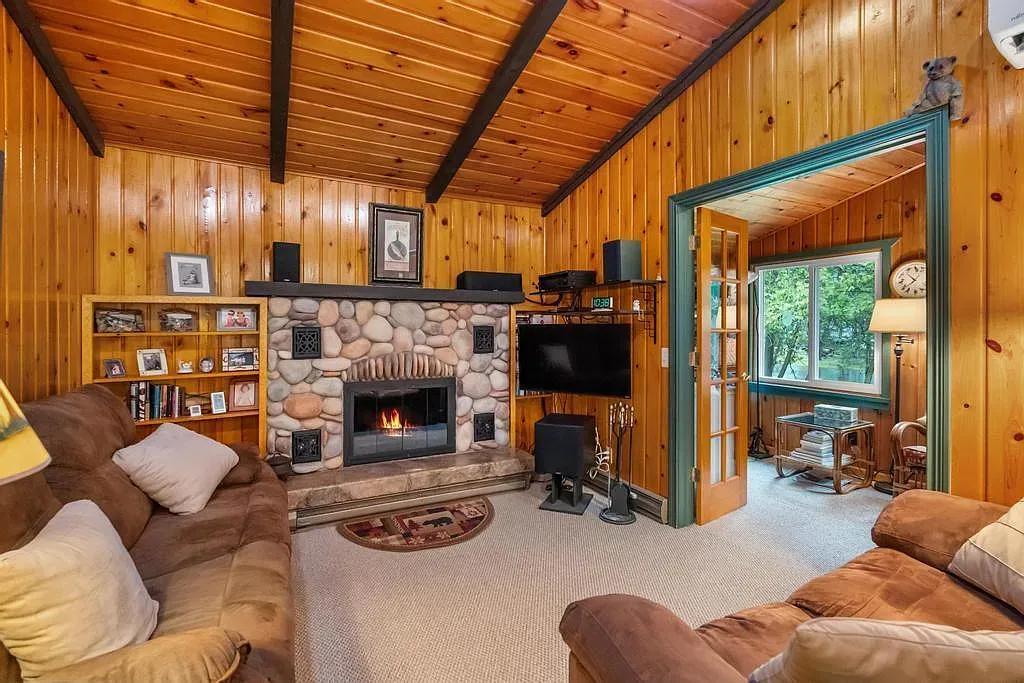 Before
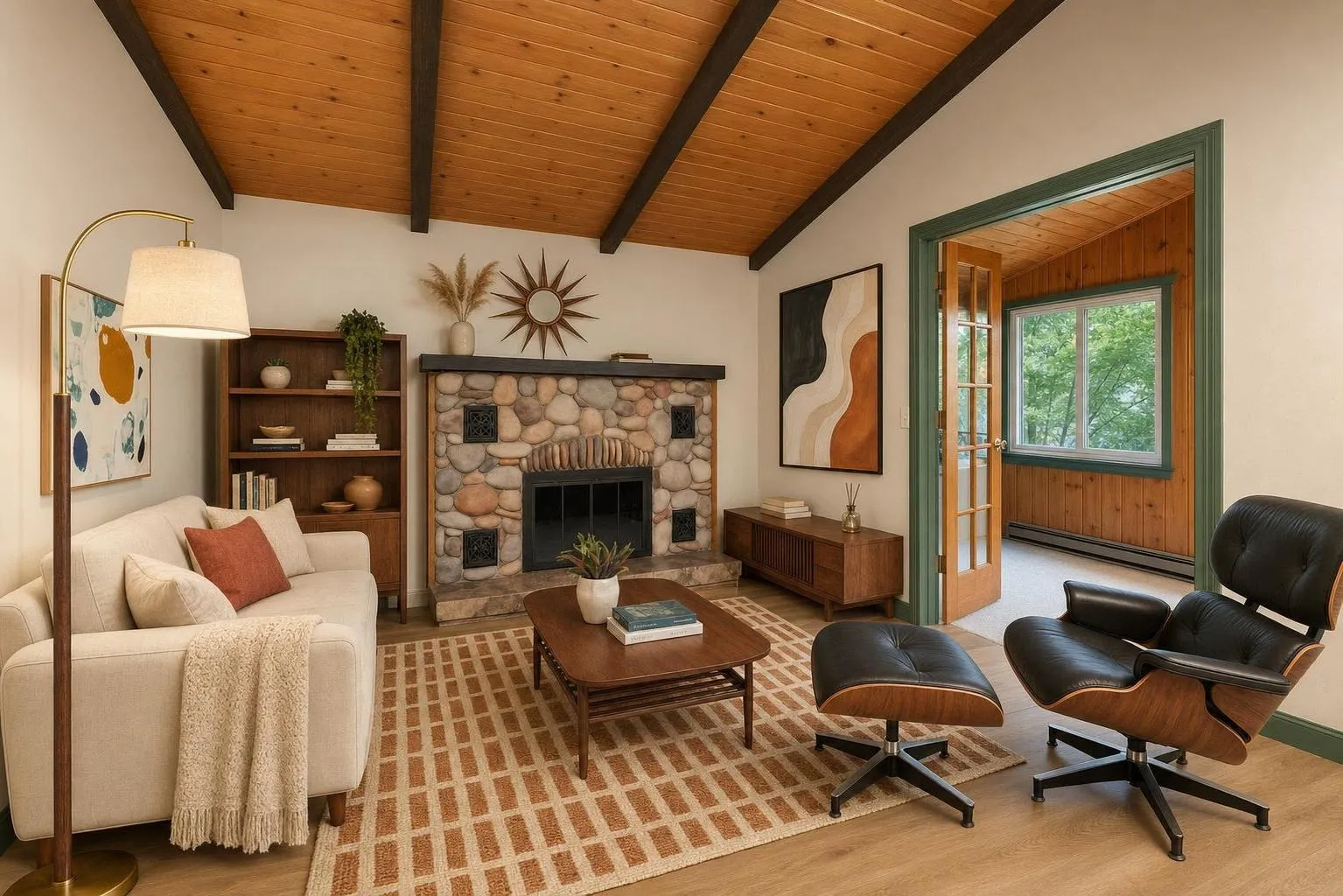 After, with airender
What Gemini does with a room photo (November 2026)
Gemini's image model is Nano Banana 2. It is free with a daily limit; paid Google AI plans raise the limit, allow sharper downloads and add "Redo with Pro". This is what Google's own pages say it does now.
Edits your own photo
Upload a picture and type the change. Google's announcement used a room: begin empty, paint the walls, then add a bookshelf, furniture or a coffee table.
Blends several photos
Upload your room plus a photo of a sofa or rug you are considering, and ask Gemini to combine them.
Takes any space
Nursery, garage gym, closet office, balcony. Google itself suggests previewing wallpaper on a room photo.
A daily quota
No number is published, only "daily quota" and plan limits of "Standard", "2x" or "4x", which Google says may change.
18+ and watermarked
Image editing isn't available under 18. Each image carries a visible watermark plus an invisible SynthID watermark.
Model choice matters
Flash-Lite runs Nano Banana 2 Lite, which Google says isn't designed for multiple image references or multiple edits. Use Flash or Pro.
| Gemini plan | US price | What changes for room images |
|---|---|---|
| Free (no plan) | $0/month | Nano Banana 2 generation and editing, "Standard limits", 1K downloads |
| Google AI Plus | $4.99/month | Limits 2x higher, 2K downloads, "Redo with Pro" to regenerate with Nano Banana Pro |
| Google AI Pro | $19.99/month | Limits 4x higher, 2K downloads, "Redo with Pro" |
| Google AI Ultra | From $99.99/month (a $199.99 tier is also listed) | Limits 5x or 20x higher than AI Pro, 2K downloads, "Redo with Pro" |
Setup: the photo and the model switch
- Daylight, lamps on, shot from a corner or doorway at chest height so two or three walls and the floor show. The best photo for AI room design has framing examples.
- Clutter can stay, since the furniture is being replaced anyway. Mail, family photos, your house number and people should be cropped out.
- No ultra wide-angle. It bends the walls, so every redesign starts from a distorted room.
- Computer: at gemini.google.com, open the sidebar and select Images, or attach your photo in the prompt box. To reopen an image: Library, click it, then Chat.
- Phone: in the Gemini app, attach the photo in the prompt box and type the edit.
- Keep the original open in another tab and judge every version against it.
Why Flash-Lite ruins room edits
On Flash-Lite, Gemini uses Nano Banana 2 Lite, aimed at quick, basic images and, per Google, not designed for multiple image references or multiple edits. A redesign is edit after edit, so switch to Flash or Pro before uploading.
Eight Gemini prompts, in the order to use them
Where these prompts come from
They follow Google's published editing templates: state exactly what changes, then state that everything else stays the same. We have not run them for this page, and results vary between tries. Swap the bracketed parts for your room.
- 1
1. Have Gemini describe the room first
Upload the photo: "Before you change anything, describe this room: the walls, windows, doors, floor, ceiling, light sources and every piece of furniture, with where each sits." Correct its errors and save the text for step 8.
- 2
2. Restyle the furniture, keep the shell
"Using the provided image, change only the furniture and decor to a warm Japandi style. Keep the walls, windows, doors, floor, ceiling and camera angle exactly the same, preserving the original lighting and composition." Swap Japandi for mid-century, coastal, Scandinavian or industrial.
- 3
3. One piece per turn
"Using the provided image, change only the sofa to a deep green velvet three-seater. Keep everything else in the image exactly the same." Then the rug, then the lighting, each in its own message.
- 4
4. Preview a wall color
"Using the provided image, repaint only the walls in a soft warm gray like Sherwin-Williams Agreeable Gray (SW 7029). Keep the furniture, floor, trim and windows exactly the same." Read it as a mood, not a paint match; to see the real SW 7029 on the same photo, use one of the free paint visualizers that work on your own room photo.
- 5
5. Drop in a product you're considering
Upload the room and a product photo together: "Image 1 is my living room. Image 2 is a sofa I'm considering. Place the sofa from image 2 against the left wall of image 1. Keep everything else in image 1 exactly the same." Google advises giving each photo a role, and warns blends can produce unnatural artifacts.
- 6
6. Furnish an empty room
"Using the provided image of my empty bedroom, add a queen bed opposite the window, two nightstands, a wool rug and a reading chair in the corner. Keep the walls, window, door, floor and camera angle exactly the same." This mirrors Google's launch demo: start empty, add pieces turn by turn.
- 7
7. See it at night
"Keep this exact room and furniture, but show it at 8 pm with only the lamps on." A room that glows in a sunny render can be gloomy after dark, and this shows whether you need another lamp.
- 8
8. Reset when it drifts
When walls warp or windows move after many edits, open a new chat, upload the original photo, paste the description from step 1 and request the latest design in a single prompt. Google recommends restarting with a detailed description when features drift.
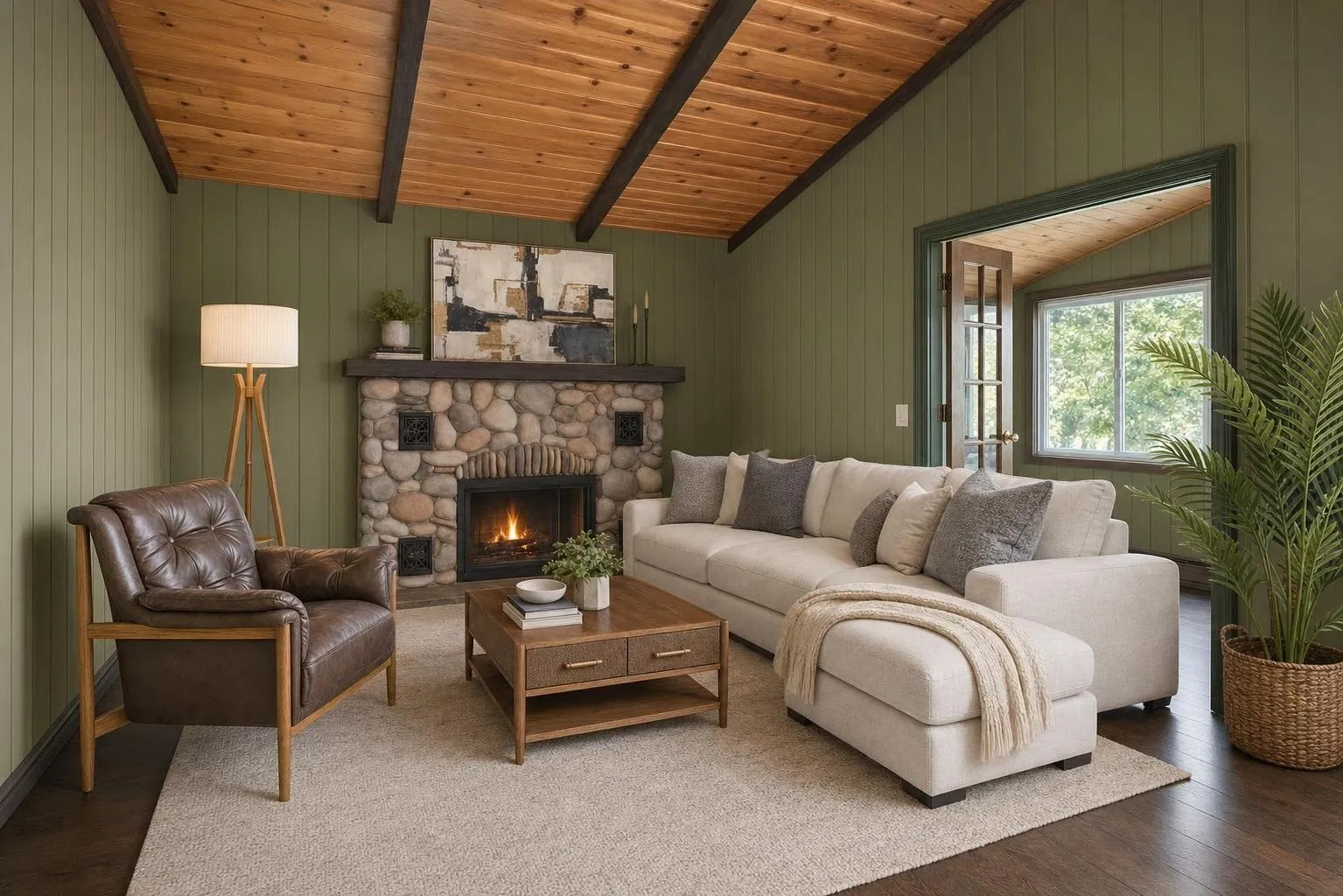
Why Gemini moves your windows
Gemini generates a new image guided by your photo instead of editing pixels, so a window narrows, the ceiling drops or the sofa swells to fill a wall it could never fit. In August 2025 Fred Nicolaus of Business of Home wrote that in his tests both Gemini and ChatGPT lost the room's architecture the longer a conversation ran.
- Repeat the keep list every time: walls, windows, doors, floor, ceiling, built-ins, camera angle. Gemini does not carry it forward reliably.
- Count against the original: windows, outlets, the ceiling line. Shifts add up over turns.
- Watch scale. A sofa that fills the wall in the picture may be 20 in (51 cm) too long in real life.
- Restart rather than repair. A fresh chat with the original beats a fifth "put the window back".
Gemini, ChatGPT or a room app
Gemini is enough for ideas, a fast wall-color or wallpaper preview, or seeing one specific sofa in your living room before ordering it. It stops at shopping. Here it is next to ChatGPT (figures from the ChatGPT room redesign walkthrough) and airender as the room app.
| Task | Gemini | ChatGPT | Room app (airender) |
|---|---|---|---|
| Cost | Free, Plus $4.99/month, Pro $19.99/month, Ultra from $99.99/month | Free (limited images), Go $8/month, Plus $20/month, Pro from $100/month | 1 free redesign (card added, $0 charged), Room Plan $27 one-time, Whole Home $75 one-time |
| Free image editing | Nano Banana 2, daily quota, no published number | "Limited image creation", no published number | 1 full redesign with the shopping list |
| Editing your own photo | Upload and type the change | Upload and type, or use the Edit button | Upload, choose room type and style, or describe changes in words |
| Placing a real product photo in your room | Yes, Google documents multi-image blending | Accepts several uploads; product placement isn't documented in the sources used here | Not a feature; it picks the products itself, and you swap any piece from the list |
| Keeping your room | Redraws; drift over long chats | Redraws; drift over long chats | Also redraws from your photo |
| Furniture in the image | Invented | Invented | Picked from real listings first, then drawn; the same pieces are on the list |
| Prices and room total | No total; US users can get shoppable listings in a separate search | Shopping research separately; no room total | Price per piece where available and a running total |
| Buying | Each piece on the store's site | Each piece on the store's site | Buy links per piece, or the whole room into your Amazon cart in one tap |
| Measurements | Not to scale | @Sketch is a rough reference, not a plan | Not to scale, no floor plans or 3D models |
Gemini for room redesign
Good
- Free image editing on an ordinary Google account
- Blends your room with a photo of a product you're considering
- Quick wall-color and wallpaper previews
- No fixed list of room types
- Google publishes clear editing templates
Watch out
- The furniture it draws is invented
- Windows, ceilings and proportions drift over long chats
- No room total, no swap-and-update, no cart
- Unpublished daily quota
- Visible watermark; editing is 18+ only
Between the two chatbots, Gemini's documented edge is multi-photo blending, useful for testing one specific product in your room. ChatGPT's is reasoning through layouts in text, plus shopping research. Most of the ChatGPT interior design prompts carry over to Gemini with the "Using the provided image" opener.
Getting from Gemini's picture to real furniture
There is no link behind Gemini's sofa. On November 13, 2025, Google said Gemini can show shoppable listings, comparison tables and prices from across the web for all US users, but that is a separate search, not a link from the pieces in your image, and Business of Home found chatbots "sometimes recommend products that do not exist". The manual route:
- 1
Name the pieces
"List every piece in this image with its color, material and a rough size in inches and cm." Treat the sizes as guesses.
- 2
Measure the real wall
Leave 30 to 36 in (76 to 91 cm) for main walkways. A 96 in (244 cm) wall takes an 84 in (213 cm) sofa with only 6 in (15 cm) per side.
- 3
Put the size in the search
"green velvet sofa under 84 inches" returns far fewer wrong answers than "green sofa". Confirm width and depth on the retailer's page.
- 4
Add it up
Total the real prices with delivery. The furniture budget calculator helps split a budget across a room.
Or reverse the order. airender chooses a real listing for every piece before it draws, then generates your room from those products, so the furniture in the design is the exact furniture on your list, with a running total and a one-tap Amazon cart. That idea is behind AI room design with the exact furniture you can buy, and how airender picks real furniture walks through it. A tip for a living room like the one above: say in the notes which fixed features stay ("keep the stone fireplace and pine ceiling"), and see AI living room design for layouts. It is an AI image, so check color and size on the listing before you order. The first full redesign is free (a card is added, $0 charged).
Affiliate note
airender's shopping links go to Amazon. As an Amazon Associate, airender.ai earns from qualifying purchases.
Three ways to waste the daily quota
- A dark or tilted photo. The model fills in what it can't see, and a shadowy corner can turn into a doorway.
- Editing the edit fifteen times. After five or six edits, restart from the original photo with your saved description.
- Choosing paint on screen. A rendered gray can read blue or beige on your wall. Test a sample in the morning and at night.
Questions people ask
Straight answers to the follow-up questions.
Is Gemini free for room redesign?
Yes. Nano Banana 2 editing is on the free plan, with a daily quota Google doesn't quantify. Google AI Plus ($4.99/month) and up add higher limits, 2K downloads and "Redo with Pro".
Can Gemini keep my exact room?
No. It generates a new image guided by your photo, so windows, ceilings and proportions can shift over a long chat. Naming what stays, one change per message and restarting from the original keep it closer.
Gemini or ChatGPT, which is better for interior design?
For placing a specific product photo into your room, Gemini, since Google documents combining several images. For talking through layouts in text, ChatGPT. Both have free limits, both drift, and both invent the furniture; the longer comparison is in [airender vs ChatGPT for room design](/airender-vs-chatgpt-for-room-design).
Can Gemini find the furniture in the picture it made?
Not directly, because those pieces don't exist. US users can get shoppable listings from across the web, but that is a separate search run piece by piece, and each result needs checking on the store's page.
Why can't I edit my room photo in Gemini?
Google says image editing isn't available to users under 18, and Flash-Lite's Nano Banana 2 Lite isn't designed for multiple edits. Switch to Flash or Pro, and if you used your daily quota, wait for the reset.
Does Gemini put a watermark on my room picture?
Yes. Google says images made or edited in the Gemini app carry a visible watermark plus an invisible SynthID watermark. Fine for planning, but don't post it as a real photo of your room.
Turn your Gemini idea into a shopping list
Upload your room photo and get a redesign built from real products, with buy links and a running total.
Related
- How to use ChatGPT to redesign your room from a photo
- 39 ChatGPT interior design prompts you can copy and paste
- ChatGPT or a room design app: which should you use to redesign your room?
- How do you take the best photo of your room for an AI redesign?
- Is there an AI tool that designs your room with the exact furniture you can buy?
- Ai living room design
Sources
- Gemini Apps Help: Generate & edit images with Gemini Apps · checked November 16, 2026
- Gemini Apps Help: Gemini Apps limits & feature availability · checked November 16, 2026
- Google Gemini: Subscriptions and plans · checked November 16, 2026
- Google Gemini: Image generation and editing overview · checked November 16, 2026
- Google Blog: Image editing in Gemini just got a major upgrade · checked November 16, 2026
- Google Developers Blog: How to prompt Gemini 2.5 Flash Image Generation for the best results · checked November 16, 2026
- Google Blog: 7 tips to get the most out of Nano Banana Pro · checked November 16, 2026
- Google DeepMind: Nano Banana 2 (Gemini image Flash) · checked November 16, 2026
- Google Blog: Let AI do the hard parts of your holiday shopping · checked November 16, 2026
- Business of Home: The AI interior design race has a surprising front-runner · checked November 16, 2026
- ChatGPT: Pricing · checked November 16, 2026
- MacRumors: ChatGPT Introduces Lower-Priced Subscription Tier · checked November 16, 2026
- MacRumors: OpenAI Adds New $100/Month ChatGPT Subscription Tier · checked November 16, 2026
- Sherwin-Williams: SW 7029 Agreeable Gray · checked November 16, 2026
Explore more room design guides
Compare AI design tools, estimate furnishing costs, and turn one room photo into a practical plan.
How this page was made
Written by Daniel Borodin, founder of airender.ai. Research and first drafts were AI-assisted; facts about other companies come from their own pages and the sources listed above, checked November 16, 2026. Prices change, so check the store before you buy. Published November 16, 2026, updated November 16, 2026.